Klaviyo Abandoned Cart Flow for Shopify: What It Is and How to Build One


A Klaviyo abandoned cart Shopify flow helps bring back shoppers who added products to cart or started checkout but did not complete their purchase.
That matters because these shoppers are not cold traffic. They already showed interest, chose a product, and moved closer to buying. The abandoned cart flow gives you a chance to follow up while that intent is still fresh.
A good abandoned cart flow does more than say “you left something behind.” It reminds shoppers what they were interested in, makes it easy to return to the cart, answers common purchase hesitations, and helps recover revenue that might otherwise be lost.
In this guide, we will cover how a Klaviyo abandoned cart flow works for Shopify, how it differs from abandoned checkout and browse abandonment, what emails to include, when to send them, how to use discounts, and what to test before turning the flow live.
Quick links:
What Is a Klaviyo Abandoned Cart Flow?
Abandoned Cart vs Abandoned Checkout vs Browse Abandonment
Why Shopify Stores Need an Abandoned Cart Flow
How to Set Up a Klaviyo Abandoned Cart Flow for Shopify
What Should an Abandoned Cart Email Include?
What Is a Klaviyo Abandoned Cart Flow?
A Klaviyo abandoned cart flow is an automated email or SMS sequence that starts when a shopper adds a product to cart or starts checkout but does not complete the purchase.
The goal is to bring that shopper back while their purchase intent is still fresh.
In Shopify, abandoned cart behavior can happen at different stages. Some shoppers add a product to cart and leave before checkout. Others start checkout, enter some information, and then drop off before placing the order.
A Klaviyo abandoned cart flow can use that behavior to send timely reminders, show the product again, answer common objections, and make the return path easy.
A strong abandoned cart flow usually includes:
- the product the shopper left behind;
- a clear return-to-cart or return-to-checkout button;
- a short reminder message;
- useful trust signals;
- shipping, returns, or payment reassurance when needed;
- a purchase filter that stops the flow after the shopper buys.
The best abandoned cart flows do not feel like generic reminders. They match the shopper’s intent, the product type, and the reason someone may have hesitated before buying.
Abandoned Cart vs Abandoned Checkout vs Browse Abandonment
Abandoned cart, abandoned checkout, and browse abandonment are not the same thing. They all show product interest, but they happen at different points in the shopping journey.
| Flow type | What it means | Intent level |
|---|---|---|
|
Browse abandonment |
A shopper viewed a product but did not add it to cart. |
Lower intent |
|
Abandoned cart |
A shopper added a product to cart but did not complete the purchase. |
Medium to high intent |
|
Abandoned checkout |
A shopper started checkout but left before placing the order. |
High intent |
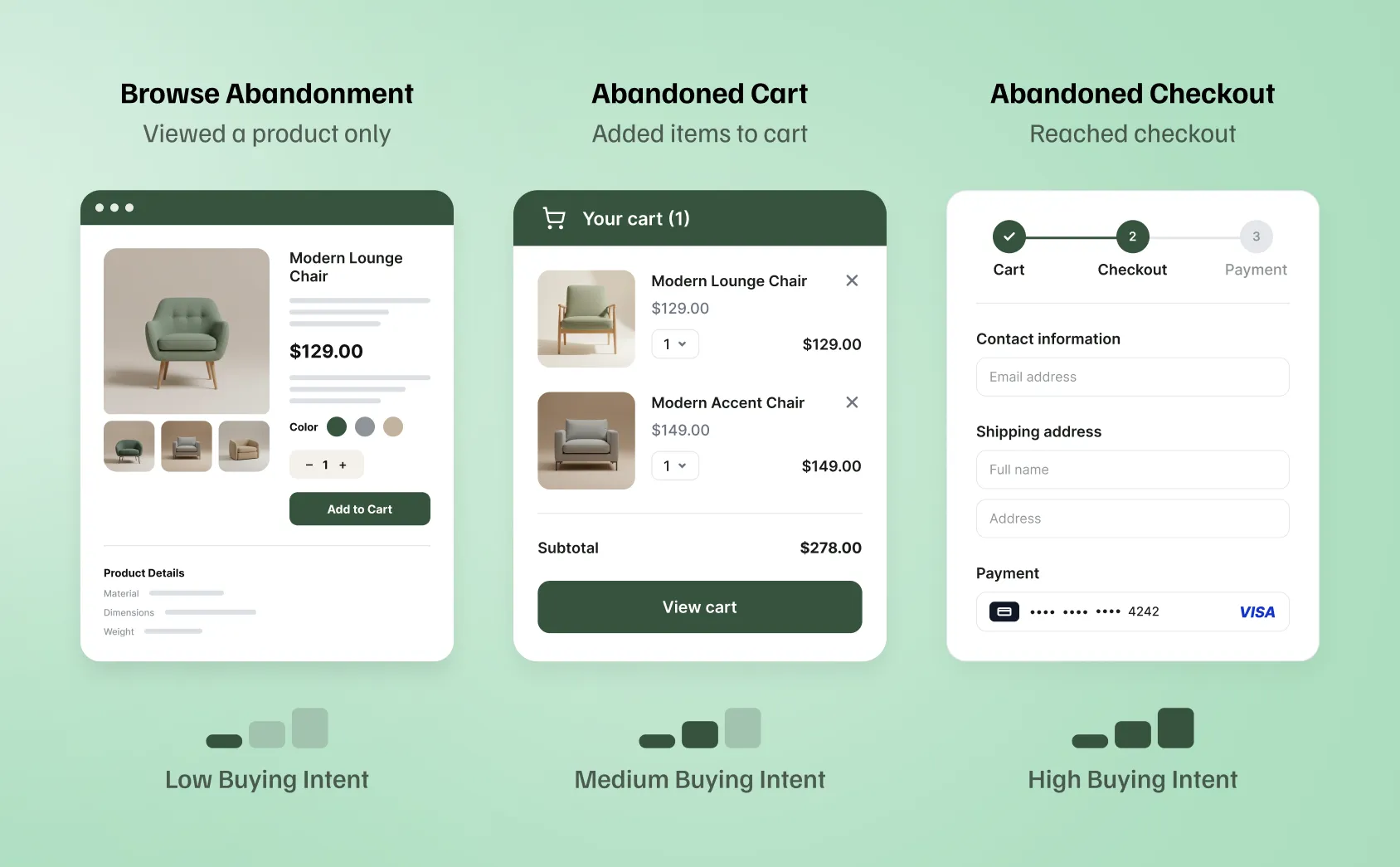
A browse abandonment flow is usually softer. The shopper looked at a product, but they may still be comparing options or learning about the brand.
An abandoned cart flow is more direct. The shopper already added something to cart, so the message can focus on the product, the cart, and the next step.
An abandoned checkout flow is usually the closest to purchase. The shopper started checkout, which means they were much closer to ordering before they dropped off.
For Shopify stores, this distinction matters because each flow should use a different message. A product browser may need more education. A cart abandoner may need a reminder and reassurance. A checkout abandoner may need a clear return-to-checkout link, payment reassurance, or help removing friction.
Why Shopify Stores Need an Abandoned Cart Flow
A Shopify abandoned cart flow helps recover shoppers who were already close to buying.
These are not random visitors. They found a product, showed interest, and took a clear action. In many cases, they left because of timing, distraction, shipping costs, payment questions, comparison shopping, or simple hesitation.
A good abandoned cart flow gives you another chance to bring them back. It can help your store:
- remind shoppers what they left behind;
- make it easy to return to the cart or checkout;
- answer common objections before they become lost sales;
- reinforce product value;
- highlight shipping, returns, payment options, or support;
- recover revenue without sending another manual campaign.
The goal is not to pressure every shopper into buying. The goal is to follow up while the product is still relevant and make the next step easy.
For many Shopify stores, the abandoned cart flow is one of the highest-priority Klaviyo flows because it targets shoppers with clear purchase intent. It should usually be built before more advanced retention, loyalty, or win-back automations.
How to Set Up a Klaviyo Abandoned Cart Flow for Shopify
A Klaviyo abandoned cart flow starts with the right trigger. Once Shopify and Klaviyo are connected, the next step is to decide which customer action should start the flow.
For most Shopify stores, this will be cart or checkout activity. The exact trigger depends on how your store is set up and which abandoned experience you want to recover.
1. Check the Shopify integration
Before building the flow itself, check that your Shopify store is connected to Klaviyo and that customer, product, cart, checkout, and order data can sync properly.
We will not cover the full integration process here. If your Shopify and Klaviyo setup is not ready yet, start with our guide on how to connect Klaviyo to Shopify.
The goal at this stage is simple: Klaviyo needs enough store data to know who abandoned the cart, what product they left behind, and whether they later completed the purchase.
2. Choose the right abandoned cart trigger
The trigger decides who enters the flow.
For Shopify stores, the most common Klaviyo abandoned cart flow uses the Started Checkout event. This targets shoppers who added a product to cart, moved into checkout, and then left before placing an order.
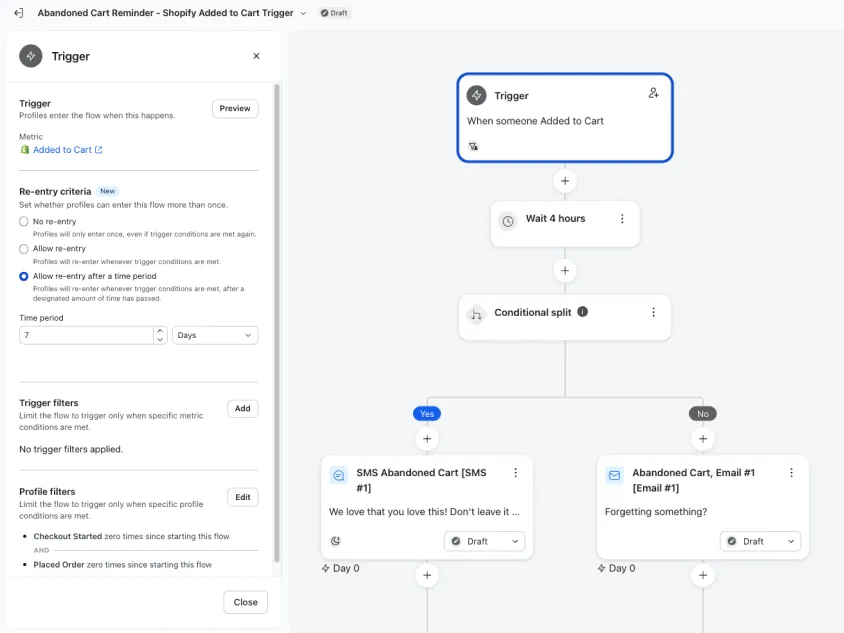
You can also create an Added to Cart abandoned cart flow. This starts earlier, when someone adds a product to cart but has not necessarily reached checkout yet.
The difference matters because the shopper’s intent is different. A checkout abandoner is usually closer to buying. An added-to-cart shopper may still be comparing products, checking prices, or deciding whether they want to continue.
For most Shopify stores, the checkout-based abandoned cart flow is the cleaner place to start. Once that is working, you can decide whether an added-to-cart flow makes sense for your store.
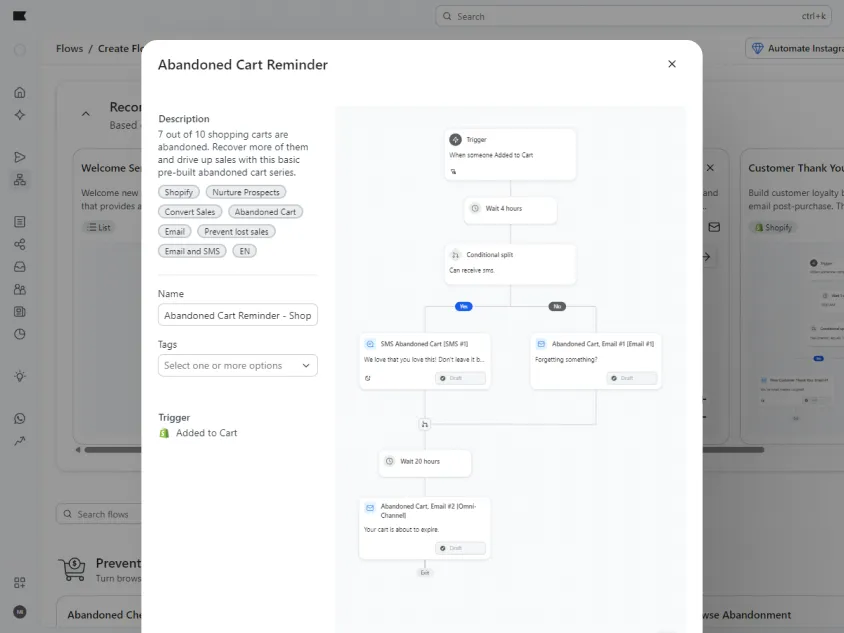
3. Start with a Klaviyo flow template or build from scratch
Klaviyo offers pre-built abandoned cart flow options, which can be useful if you are setting up the flow for the first time.
A template gives you a starting structure, but it should not be treated as finished. You still need to adjust the copy, design, product block, timing, filters, and offer logic for your store.
The goal is not to publish a default Klaviyo template as quickly as possible. The goal is to create an abandoned cart flow that matches your products, your brand, and the reason someone may have hesitated before buying.
4. Add the first abandoned cart email
The first email should make it easy for the shopper to return to the cart or checkout.
Keep it direct. Show the product they left behind, use a clear CTA, and avoid overloading the email with too many messages.
A strong first abandoned cart email usually includes:
- the abandoned product;
- a short reminder;
- a clear return-to-cart or return-to-checkout button;
- product benefits or trust signals;
- shipping, payment, or return reassurance if needed.
In most cases, the first email does not need to lead with a discount. The shopper already showed intent, so start with the simplest reminder first. Discounts can be tested later in the sequence if they make sense.
5. Add follow-up emails
The first abandoned cart email is usually a reminder. The follow-up emails should give the shopper another reason to come back.
A simple Klaviyo abandoned cart flow may include two or three emails:
Email 1: Cart reminder
Remind the shopper what they left behind and make it easy to return to the cart or checkout.
Email 2: Product value or objection handling
Use this email to answer common hesitation points. You can mention product benefits, reviews, shipping, returns, payment options, sizing, ingredients, materials, or support.
Email 3: Final reminder or incentive
Use the last email as a final nudge. If you plan to offer a discount, this is often a better place to introduce it than the first email.
Not every store needs three emails. If your products are low-consideration, one or two emails may be enough. If your products are more expensive, customizable, or require more trust, a longer sequence can make sense.
The goal is to avoid sending the same reminder three times. Each email should have a slightly different role.
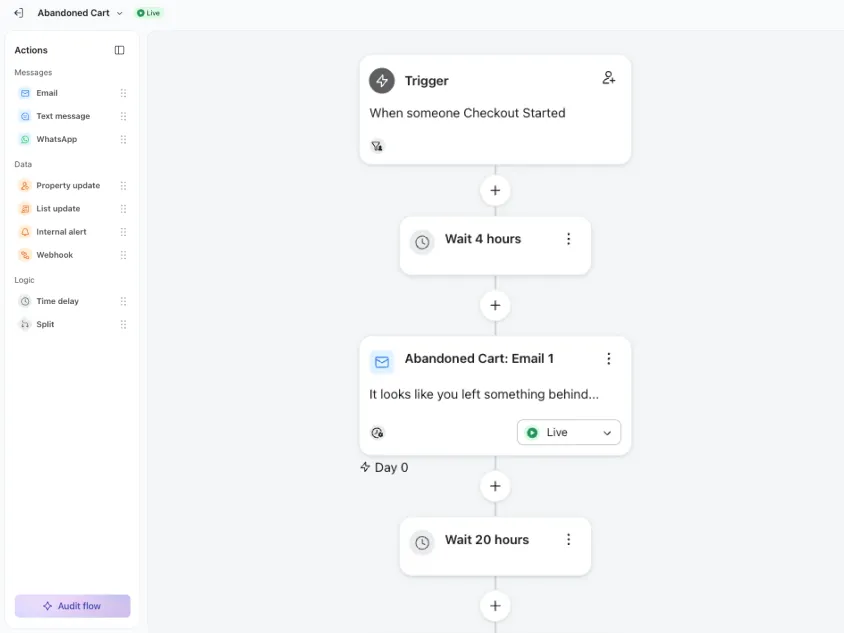
6. Set the timing between emails
Timing decides how quickly the abandoned cart flow follows up after the shopper leaves.
In Klaviyo, you can control this with time delays between the trigger and each message. If you start from a Klaviyo abandoned cart flow template, it will usually include preset delays, but you can edit them based on your products, buying cycle, and customer behavior.
For many Shopify stores, a practical starting point is:
| Suggested timing | Purpose | |
|---|---|---|
|
Email 1 |
Around 2–4 hours after cart or checkout abandonment |
Remind the shopper while the product is still fresh |
|
Email 2 |
Around 20–24 hours later |
Answer objections and reinforce product value |
|
Email 3 |
Around 48 hours later |
Send a final reminder or introduce an incentive |
The first email should not usually send immediately. Give the shopper some time to complete the purchase on their own. Sending too quickly can feel unnecessary, especially if they only stepped away from checkout for a few minutes.
The second email should add something new. This can be product benefits, reviews, shipping information, return reassurance, payment options, or customer support.
The third email should be used carefully. If you use a discount, this is often a better place for it than the first email, because the shopper has already ignored the earlier reminders.
These timings are a starting point, not a fixed rule. A low-cost impulse product may need a shorter sequence. A higher-ticket or more considered purchase may need more space between emails.
If you add SMS to an abandoned cart flow, be more careful. Klaviyo notes that SMS cart abandonment messages should be sent within 48 hours of the triggering event, and US SMS cart abandonment guidance says to send only one SMS per recipient in a cart abandonment flow.
7. Add flow filters and exclusions
Flow filters decide who should continue through the abandoned cart flow and who should be removed before receiving another message.
This step is essential because the trigger only tells Klaviyo that someone started checkout or added a product to cart. It does not automatically mean they should keep receiving reminders.
For a checkout-based abandoned cart flow, Klaviyo’s own flow guidance uses the idea of filtering out people who placed an order after entering the flow. In practice, this means the flow should not keep sending if the shopper has already completed the purchase.
At minimum, use a purchase filter such as:
Placed Order zero times since starting this flow
This keeps the flow focused on shoppers who abandoned the cart or checkout, not people who already bought.
You can also use filters or splits to handle cases like:
- someone placed an order after entering the flow;
- someone is already in another active flow;
- someone recently purchased and should not receive a discount;
- someone is a first-time shopper vs. returning customer;
- someone qualifies for email, SMS, or both;
- someone should receive a discount only after the first reminder;
- someone abandoned a specific product or product category.
If you use discounts, filters become even more important. You may not want every cart abandoner to receive the same offer. For example, you might only show a discount to first-time buyers, high-cart-value shoppers, or people who did not click the first reminder.
The goal is simple: keep the abandoned cart flow relevant, and stop it as soon as the message no longer makes sense.
8. Test the full cart or checkout path
Do not test only the email preview.
Before turning the flow live, test the real Shopify cart or checkout path. Klaviyo notes that Started Checkout is commonly used for abandoned cart flows, and if that event is not tracking properly, the flow may not work as expected.
A practical test of abandoned cart path should look like this:
- Open your Shopify store in an incognito or private browser.
- Add a product to cart.
- Start checkout, if your flow uses the Started Checkout trigger.
- Enter the email address you want to use for testing.
- Leave checkout without placing the order.
- Check whether the test profile enters the abandoned cart flow in Klaviyo.
- Preview or receive the email and check the product block.
- Click the return-to-cart or return-to-checkout CTA.
- Complete a test order, if possible.
- Confirm that the profile exits the flow after purchase.
Also check:
- the correct product appears in the email;
- the product image, name, price, and CTA are pulling correctly;
- the cart or checkout link goes to the right place;
- the email looks good on mobile;
- any discount code works;
- old abandoned cart emails are paused or reviewed;
- the purchase filter removes buyers from the flow;
- the timing delays and splits behave as expected.
This is worth doing because an abandoned cart email can look perfect in preview and still fail in the real path. The most common issues are usually tracking, product blocks, return links, discounts, or purchase filters — not the visual design of the email.
What Should an Abandoned Cart Email Include?
An abandoned cart email should make it easy for the shopper to remember the product, understand why it is worth buying, and return to the cart or checkout.
The email does not need to be long. In most cases, it needs to be clear.
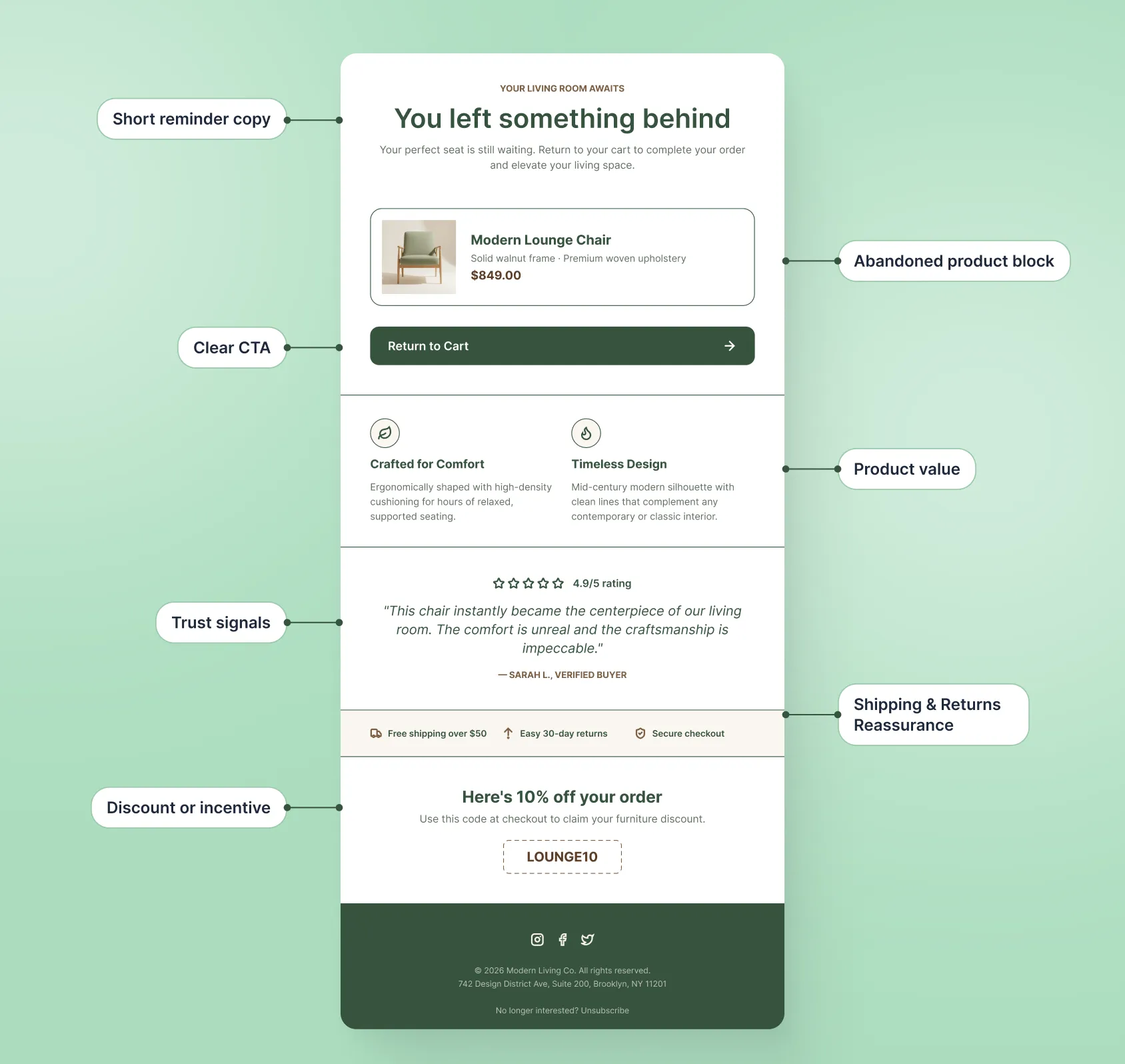
A strong abandoned cart email usually includes:
| Element | Why it matters | Quick tip |
|---|---|---|
|
Abandoned product block |
Shows the exact product the shopper left behind and makes the email feel relevant. |
Include the product image, name, price, and a clear return button. |
|
Clear CTA |
Helps the shopper continue without searching for the product again. |
Use direct CTA text like “Return to cart,” “Complete your order,” or “Continue checkout.” |
|
Short reminder copy |
Keeps the email focused and easy to act on. |
Avoid long explanations in the first reminder. |
|
Product value |
Reminds the shopper why they were interested in the product. |
Add one or two benefits, not a full product page. |
|
Trust signals |
Helps reduce hesitation before purchase. |
Use reviews, ratings, press mentions, guarantees, or support details. |
|
Shipping or returns reassurance |
Addresses common reasons shoppers leave before buying. |
Mention free shipping, easy returns, payment options, or delivery details if they matter. |
|
Discount or incentive |
Can help recover hesitant shoppers, but may reduce margin or train discount behavior. |
Save it for later in the sequence or use it only for selected segments. |
Common Klaviyo Abandoned Cart Flow Mistakes
A Klaviyo abandoned cart flow can look simple, but small setup mistakes can affect who enters the flow, what they receive, and whether the email brings them back to checkout.
| Mistake | Why it matters | What to do instead |
|---|---|---|
|
Using the wrong trigger |
An Added to Cart flow and a Started Checkout flow target shoppers at different stages. If the trigger does not match the message, the email can feel too early, too direct, or irrelevant. |
Choose the trigger based on the abandonment stage you want to recover. Use Started Checkout for shoppers closer to purchase, and Added to Cart for earlier cart activity. |
|
Sending reminders after the shopper buys |
Nothing feels more broken than receiving a cart reminder after completing the purchase. It can hurt trust and make the automation look poorly managed. |
Add purchase filters so shoppers exit the flow once they place an order. |
|
Sending the same reminder multiple times |
Repeating the same message gives the shopper no new reason to return. It can make the flow feel lazy or annoying. |
Give each email a different role: reminder, reassurance, final nudge, or selected incentive. |
|
Offering a discount too early |
Shoppers may learn to abandon carts and wait for a code, which can reduce margin over time. |
Start with a clear reminder, product value, trust signals, and checkout reassurance. Use discounts later in the sequence or only for selected segments. |
|
Making the email too busy |
Too many sections, products, links, or competing CTAs can distract from the main goal: returning to the abandoned cart or checkout. |
Keep the email focused on the abandoned product and the next step. Use one main CTA. |
|
Sending too soon or too often |
If the first email sends immediately, it can feel unnecessary. If the sequence is too aggressive, it can create fatigue. |
Use practical delays between messages and adjust timing based on your product price, buying cycle, and customer behavior. |
|
Not testing the return link |
The email may look fine in preview, but the CTA may not take shoppers back to the right cart or checkout. |
Test the full path from cart or checkout abandonment to email click and purchase completion. |
|
Ignoring mobile rendering |
Many shoppers open cart recovery emails on mobile. If the product block, CTA, or layout breaks, the email becomes harder to act on. |
Preview and test the abandoned cart email on mobile before turning the flow live. |
|
Using generic copy for every product |
A generic reminder may work for simple products, but it can underperform when shoppers need reassurance, education, or trust before buying. |
Adjust messaging based on product type, price point, purchase hesitation, and customer segment. |
The main mistake is treating the abandoned cart flow as a default reminder instead of a customer journey moment. The better approach is to make each message useful, timely, and easy to act on.
How to Measure Abandoned Cart Flow Performance
Once your Klaviyo abandoned cart flow is live, review it from the flow itself.
In Klaviyo, go to Flows, open your abandoned cart flow, and check the performance of each email in the flow canvas. Do not look only at total flow revenue. Look at where shoppers click, where they buy, and where they drop off.
Check:
- Placed Order rate — shows whether the flow is actually recovering purchases.
- Click rate — shows whether shoppers are interested enough to return to the cart or checkout.
- Revenue per recipient — helps you compare how much value each email adds.
- Unsubscribe rate — shows whether the flow feels too aggressive or irrelevant.
- Performance by email — shows whether Email 2 or Email 3 are still adding value.
- Link activity — shows whether people are clicking the return-to-cart or return-to-checkout CTA.
- Discount usage — shows whether incentives are helping recovery or only reducing margin.
Pay close attention to the gap between clicks and orders. If shoppers click the cart or checkout link but do not buy, the issue may not be the email. Check the cart link, checkout page, shipping cost, discount code, payment options, and delivery details.
Use the data to make specific changes. If clicks are low, review the subject line, product block, CTA, and message. If clicks are strong but orders are low, test the checkout path. If the last email adds little revenue, shorten the sequence or change its angle.
Need help setting up your Klaviyo abandoned cart flow?
An abandoned cart flow can recover high-intent shoppers, but only if the trigger, timing, filters, product blocks, email design, and testing are set up properly.
At MailBakery, we help Shopify brands set up Klaviyo flows that support the full customer journey — from abandoned cart and abandoned checkout to welcome, post-purchase, replenishment, win-back, and retention automations.